2013년 11월 22일 금요일

reading and writing

OpenCV is a useful library comprised of many functions for computer vision and other related image processing fields. Here, I present a sample using the video processing capabilities of the latest OpenCV 2.2 library.
#include "opencv2/opencv.hpp"

int main( int argc, char** argv ) {

 cvNamedWindow( "Canny", CV_WINDOW_AUTOSIZE );

 // GET video
 CvCapture* capture = cvCreateFileCapture( "sample.avi" );
 if (!capture ) {
  printf( "Unable to read input video." );
  return 0;
 }

  double fps = cvGetCaptureProperty(
  capture,
  CV_CAP_PROP_FPS
  );

 // Read frame
 IplImage* frame = cvQueryFrame( capture );
 
 // INIT the video writer
 CvVideoWriter *writer = cvCreateVideoWriter(
  "out.avi",
  CV_FOURCC('M', 'J', 'P', 'G'),
  fps,
  cvGetSize(frame)
  );

 // DECLARE greyscale image to hold the result
 IplImage* edges  = cvCreateImage(
  cvGetSize(frame)
  , IPL_DEPTH_8U
  , 1
  );

 while(1) {

  // PERFORM canny edge detection
  cvCvtColor( frame, edges, CV_BGR2GRAY );        
        cvCanny( edges, edges, 1.0, 1.0, 3 );

  // WRITE the result
  cvCvtColor( edges, frame, CV_GRAY2BGR );
  cvWriteFrame( writer, frame );

  cvShowImage( "Canny", frame );

  // READ next frame
  frame = cvQueryFrame( capture );
  if( !frame ) break;

  char c = cvWaitKey(33);
  if( c == 27 ) break;
 }

 // CLEAN everything
 cvReleaseImage( &edges );
 cvReleaseImage( &frame );
 cvReleaseCapture( &capture );
 cvReleaseVideoWriter( &writer );

 cvDestroyWindow( "Canny" );
 return 0;
}

2013년 11월 21일 목요일

Linux で OpenCV バージョン 2.4.7

번역에서 제공
[サイトマップへ]  

Linux で OpenCV バージョン 2.4.7 のダウンロードとビルドとインストールとテスト実行

OpenCV (Open Computer Vision Library) とは, 実時間コンピュータビジョン (real time computer vision) の アルゴリズムと文書とサンプルコードの集まり.
この Web ページでは,Linux (Ubuntu) での OpenCV バージョン 2.4.7のビルドとインストール手順を図解等で説明します.
この Web ページでは、以下,次の2通りの手順について説明しています
  • Ubuntu で OpenCV バージョン 2.4.7 のダウンロードとビルドとインストールを行うシェルスクリプト
  • Linux で, コマンドを手入力して,OpenCV バージョン 2.4.7 のソースコードのダウンロードとビルドとインストールを行う場合の手順 (Ubuntu を使用)
    → 他の Linux でも同様の手順になると思います.
末尾にはサンプルプログラムのソースコードと動作手順も付けています。
Ubuntu での Intel TBB (Intel Threading Building Blocks) インストール手順は, 別の Web ページで説明しています.
※ 参考 Web ページ: http://opencv.jp/

Ubuntu で OpenCV バージョン 2.4.7 のダウンロードとビルドとインストールを行うシェルスクリプト

楽をしたいのでシェルスクリプトを作りました。 Ubuntu で下記のシェルスクリプトを実行すると、 OpenCV バージョン 2.4.7 のダウンロードとビルドとインストールが行われます. Ubuntu 12.04 を用いて動作確認済みです.
※ 1つ1つコマンドを入力したい(シェルスクリプトにしたくない)場合については、この Web ページの下で説明しています。
# 最初は前提ソフトウエアのインストール
sudo apt-get -yV install build-essential
#
cd /tmp; sudo apt-get source opencv
sudo apt-get -yV build-dep opencv 
# 
sudo apt-get -yV install libqt4-dev 
sudo apt-get -yV install libgtk2.0-dev 
sudo apt-get -yV install pkg-config 
#
sudo apt-get -yV install opencl-headers 
# 
sudo apt-get -yV install libgomp1
# 
sudo apt-get -yV install libjpeg-dev
sudo apt-get -yV install libopenjpeg-dev
sudo apt-get -yV install jasper
sudo apt-get -yV install libjasper-dev libjasper-runtime
sudo apt-get -yV install libpng12-dev
sudo apt-get -yV install libpng++-dev libpng3
sudo apt-get -yV install libpnglite-dev libpngwriter0-dev libpngwriter0c2
sudo apt-get -yV install libtiff-dev libtiff-tools pngtools
sudo apt-get -yV install zlib1g-dev zlib1g-dbg
sudo apt-get -yV install v4l2ucp
#
sudo apt-get -yV install python
sudo apt-get -yV install autoconf
sudo apt-get -yV install libtbb2 libtbb-dev
sudo apt-get -yV install libeigen2-dev
sudo apt-get -yV install cmake
sudo apt-get -yV install openexr
sudo apt-get -yV install gstreamer-plugins-*
sudo apt-get -yV install freeglut3-dev
sudo apt-get -yV install libglui-dev
sudo apt-get -yV install libavc1394-dev libdc1394-22-dev libdc1394-utils
# ビデオ関係のパッケージ 
sudo apt-get -yV install libxine-dev
sudo apt-get -yV install libxvidcore-dev 
sudo apt-get -yV install libva-dev
sudo apt-get -yV install libssl-dev
sudo apt-get -yV install libv4l-dev
sudo apt-get -yV install libvo-aacenc-dev
sudo apt-get -yV install libvo-amrwbenc-dev 
sudo apt-get -yV install libvorbis-dev 
sudo apt-get -yV install libvpx-dev

cd /tmp
# if [ ! -f OpenCV-2.4.7.tar.bz2 ]; then 
#     wget http://sourceforge.net/projects/opencvlibrary/files/opencv-unix/2.4.7/OpenCV-2.4.7.tar.bz2
# fi 
wget https://github.com/Itseez/opencv/archive/2.4.7.tar.gz
mv 2.4.7.tar.gz OpenCV-2.4.7.tar.gz

sudo rm -rf OpenCV-2.4.7
tar -xvzof /tmp/OpenCV-2.4.7.tar.gz
cd opencv-2.4.7
cmake -DBUILD_SHARED_LIBS=OFF -DBUILD_DOCS=ON -DBUILD_EXAMPLES=ON -DCMAKE_BUILD_TYPE=RELEASE -DWITH_TBB=ON -DWITH_GTK=ON -DWITH_OPENGL=ON -DWITH_QT=ON -DINSTALL_C_EXAMPLES=ON -DWITH_OPENCL=OFF -DWITH_CUDA=OFF -DWITH_OPENNI=ON -DWITH_UNICAP=ON -DWITH_V4L=ON -DWITH_XINE=ON -DWITH_OPENEXR=ON -DBUILD_OPENEXR=ON .
make
sudo make install
sudo ldconfig
OpenCV のサンプルプログラムは、このWebページの末尾につけています.

Linux で, コマンドを手入力して,OpenCV バージョン 2.4.7 のソースコードのダウンロードとビルドとインストールを行う場合の手順 (Ubuntu や Fedora を使用)

前準備

■ Ubuntu 12.04 の場合の操作手順(例)
Ubuntu の他のバージョンでも同様の手順になります
  1. アップデート操作
    sudo apt-get -yV update
    sudo apt-get -yV upgrade
    sudo reboot
    
  2. ビルドに必要となる前提ソフトウエアのインストール 
    「apt-get build-dep」を使うと簡単.
    sudo apt-get -yV install build-essential
    #
    cd /tmp; sudo apt-get source opencv
    sudo apt-get -yV build-dep opencv 
    # 
    sudo apt-get -yV install libqt4-dev 
    sudo apt-get -yV install libgtk2.0-dev 
    sudo apt-get -yV install pkg-config 
    # 
    sudo apt-get -yV install opencl-headers 
    # 
    sudo apt-get -yV install libjpeg-dev
    sudo apt-get -yV install libopenjpeg-dev
    sudo apt-get -yV install jasper
    sudo apt-get -yV install libjasper-dev libjasper-runtime
    sudo apt-get -yV install libpng12-dev
    sudo apt-get -yV install libpng++-dev libpng3
    sudo apt-get -yV install libpnglite-dev libpngwriter0-dev libpngwriter0c2
    sudo apt-get -yV install libtiff-dev libtiff-tools pngtools
    sudo apt-get -yV install zlib1g-dev zlib1g-dbg
    sudo apt-get -yV install v4l2ucp
    #
    sudo apt-get -yV install python
    sudo apt-get -yV install autoconf
    sudo apt-get -yV install libtbb2 libtbb-dev
    sudo apt-get -yV install libeigen2-dev
    sudo apt-get -yV install cmake
    sudo apt-get -yV install openexr
    sudo apt-get -yV install gstreamer-plugins-*
    sudo apt-get -yV install freeglut3-dev
    sudo apt-get -yV install libglui-dev
    sudo apt-get -yV install libavc1394-dev libdc1394-22-dev libdc1394-utils
    # ビデオ関係のパッケージ 
    sudo apt-get -yV install libxine-dev
    sudo apt-get -yV install libxvidcore-dev 
    sudo apt-get -yV install libva-dev
    sudo apt-get -yV install libssl-dev
    sudo apt-get -yV install libv4l-dev
    sudo apt-get -yV install libvo-aacenc-dev
    sudo apt-get -yV install libvo-amrwbenc-dev 
    sudo apt-get -yV install libvorbis-dev 
    sudo apt-get -yV install libvpx-dev
    
■ Fedora 15 の場合の操作手順(例)
  1. アップデート操作
    sudo yum check-update
    sudo yum update
    sudo reboot
    
  2. ビルドに必要となる前提ソフトウエアのインストール  p
    python, gtk+ などのインストールを行う
    yum install gcc
    yum install g++
    yum install python
    yum install gtk+-devel
    yum install libjpeg-devel
    yum install libtiff-devel
    yum install jasper-devel
    yum install libpng-devel
    yum install zlib-devel
    # 4 エル 2
    yum install v4l2*
    yum install totem
    yum install xine
    yum install unicap-devel
    yum install autoconf
    

OpenCV のダウンロードとビルトとインストール手順

  1. Web ページを開く
  2. Files」をクリック
  3. opencv-unix」をクリック
  4. 最新版である「2.4.7」をクリック
  5. opencv-2.4.7.tar.gz をクリックして、ダウンロード。
  6. ダウンロードと展開
    以下の操作はコンソールで行う(以下、画面キャプチャは Ubuntu 12.04 のもの)
    ※ ダウンロードしたファイルを /tmp に置いている
    cd /tmp
    tar -xvzof /tmp/opencv-2.4.7.tar.gz
    
  7. (オプション) 「ccmake .」を実行して,設定を確認する
  8. 「cmake .」の実行
    ◆実行例
    参考 Web ページ: 「-DBUILD_SHARED_LIBS=OFF」については、http://docs.opencv.org/doc/tutorials/introduction/desktop_java/java_dev_intro.html
    cd opencv-2.4.7
    cmake -DBUILD_DOCS=ON -DBUILD_EXAMPLES=ON -DCMAKE_BUILD_TYPE=RELEASE -DWITH_TBB=ON -DWITH_GTK=ON -DWITH_OPENGL=ON -DWITH_QT=ON -DINSTALL_C_EXAMPLES=ON -DWITH_OPENCL=OFF -DWITH_CUDA=OFF -DWITH_OPENNI=ON -DWITH_UNICAP=ON -DWITH_V4L=ON -DWITH_XINE=ON  .
    
    ※ バージョン 2.4.4 では-DBUILD_opencv_java=OFFをつける.エラーの回避のため(環境によって、エラーが出ない場合もあると思います)。
  9. cmake . の結果の確認
  10. make の実行
    make
    
  11. make の結果の確認
    エラーメッセージが出ていないこと
    ※ make のときにエラーが出たら 「cmake .」のところに戻って cmake のパラメータを調整して、もう1度繰り返す。
  12. sudo make install の実行
    sudo make install
    
  13. sudo make install の結果の確認
    ※ エラーメッセージが出ていないこと
  14. sudo ldconfig の実行

試しに OpenCV を使ってみる

画像ファイルの読み込みと表示

◆プログラムの例
  • imread: 画像ファイルの読み込み
  • namedWindow: ウインドウを開く
  • imshow: ウインドウに画像を表示
#include <opencv2/core/core.hpp>
#include <opencv2/highgui/highgui.hpp>

using namespace cv;

int main( int argc, char** argv )
{
  Mat rgb;

  rgb = imread( "/usr/local/share/OpenCV/samples/c/fruits.jpg", /* 3-channel color image */ 1 );
  namedWindow( "Display Image", CV_WINDOW_AUTOSIZE | CV_WINDOW_FREERATIO );
  imshow( "Display Image", rgb );

  waitKey(0);

  return 0;
}
◆コンパイルコマンドの例
Linux の場合を示しています.
g++ -o a.out hoge.cc -I/usr/local/include/opencv2 -I/usr/local/include/opencv -L/usr/local/lib -lopencv_highgui -lopencv_core
◆ 実行結果の例 (OpenCV バージョン 2.4.6.1 で実行)
./a.out

カラー画像の濃淡画像への変換

◆プログラムの例
  • cvtColor: 色空間における変換
#include <opencv2/core/core.hpp>
#include <opencv2/imgproc/imgproc.hpp>
#include <opencv2/highgui/highgui.hpp>

using namespace cv;

int main( int argc, char** argv )
{
  Mat rgb, gray; 

  rgb = imread( "/usr/local/share/OpenCV/samples/c/fruits.jpg", /* 3-channel color image */ 1 );
  cvtColor(rgb, gray, CV_BGR2GRAY);

  namedWindow( "Display Image", CV_WINDOW_AUTOSIZE | CV_WINDOW_FREERATIO );
  imshow( "Display Image", gray );

  waitKey(0);

  return 0;
}
◆コンパイルコマンドの例
Linux の場合を示しています.
g++ -o a.out hoge.cc -I/usr/local/include/opencv2 -I/usr/local/include/opencv -L/usr/local/lib -lopencv_highgui -lopencv_imgproc -lopencv_core
◆ 実行結果の例 (OpenCV バージョン 2.4.6.1 で実行)
./a.out

Opening と Closing によるノイズ除去

◆プログラムの例
  • morphologyEx: 構造要素を用いたモルフォロジー演算
#include <opencv2/core/core.hpp>
#include <opencv2/imgproc/imgproc.hpp>
#include <opencv2/highgui/highgui.hpp>

using namespace cv;

int main( int argc, char** argv )
{
  Mat rgb, hsv, hsv2, hsv3, rgb3;

  rgb = imread( "/usr/local/share/OpenCV/samples/c/fruits.jpg", /* 3-channel color image */ 1 );
  cvtColor(rgb, hsv, CV_BGR2HSV);
  morphologyEx(hsv, hsv2, MORPH_OPEN, getStructuringElement(MORPH_ELLIPSE, Size(1, 1) ) ) ;
  morphologyEx(hsv2, hsv3, MORPH_CLOSE, getStructuringElement(MORPH_ELLIPSE, Size(1, 1) ) ) ;
  cvtColor(hsv3, rgb3, CV_HSV2BGR);

  namedWindow( "Display Image", CV_WINDOW_AUTOSIZE | CV_WINDOW_FREERATIO );
  imshow( "Display Image", rgb3 );

  waitKey(0);

  return 0;
}
◆コンパイルコマンドの例
Linux の場合を示しています.
g++ -o a.out hoge.cc -I/usr/local/include/opencv2 -I/usr/local/include/opencv -L/usr/local/lib -lopencv_highgui -lopencv_imgproc -lopencv_core
◆ 実行結果の例 (OpenCV バージョン 2.4.6.1 で実行)
./a.out

Configure OpenCV 2.4 for Qt Creator on Ubuntu

Configure OpenCV 2.4 for Qt Creator on Ubuntu

First install Qt creator using Ubuntu Software Center

Open Qt Creator

File --> New file or project
Qt Widget Project --> Qt GUI Application --> Choose

Click Next for all.

Open .pro file and add the following lines

INCLUDEPATH += /usr/local/include/opencv
LIBS += -L/usr/local/lib
LIBS += -lopencv_core
LIBS += -lopencv_imgproc
LIBS += -lopencv_highgui
LIBS += -lopencv_ml
LIBS += -lopencv_video
LIBS += -lopencv_features2d
LIBS += -lopencv_calib3d
LIBS += -lopencv_objdetect
LIBS += -lopencv_contrib
LIBS += -lopencv_legacy
LIBS += -lopencv_flann
LIBS += -lopencv_nonfree


Save it.

Open .ui file.

Drag and drop a PushButton to window.
Click PushButton and chage the follwong properties
  • objectName: btnDisplay
  • text: Display

Right click PushButton --> Go to slot --> clicked() --> Ok

Include the following

#include <cv.h>
#include <highgui.h>


Add the following code

void MainWindow::on_btnDisplay_clicked()
{
    cv::namedWindow("Disp");
    cv::VideoCapture cap(0);
    cv::Mat frame;
    do{
        cap >> frame;
        imshow("Disp",frame);
    }while(cv::waitKey(30)<0);
    cv::destroyAllWindows();
}


Run it. You will see yourself on the screen, when you click Display button !!!

Install OpenCV in Ubuntu 12.04

Install OpenCV in Ubuntu 12.04

Copy the following script to gedit and save as opencv.sh . Open terminal.
chmox +x opencv.sh
./opencv.sh

This will complete opencv installation

arch=$(uname -m)
if [ "$arch" == "i686" -o "$arch" == "i386" -o "$arch" == "i486" -o "$arch" == "i586" ]; then
flag=1
else
flag=0
fi
echo "Installing OpenCV 2.4.3"
mkdir OpenCV
cd OpenCV
echo "Removing any pre-installed ffmpeg and x264"
sudo apt-get remove ffmpeg x264 libx264-dev
echo "Installing Dependenices"
sudo apt-get install libopencv-dev
sudo apt-get install build-essential checkinstall cmake pkg-config yasm
sudo apt-get install libtiff4-dev libjpeg-dev libjasper-dev
sudo apt-get install libavcodec-dev libavformat-dev libswscale-dev libdc1394-22-dev libxine-dev libgstreamer0.10-dev libgstreamer-plugins-base0.10-dev libv4l-dev
sudo apt-get install python-dev python-numpy
sudo apt-get install libtbb-dev
sudo apt-get install libqt4-dev libgtk2.0-dev
echo "Downloading x264"
wget ftp://ftp.videolan.org/pub/videolan/x264/snapshots/x264-snapshot-20120528-2245-stable.tar.bz2
tar -xvf x264-snapshot-20120528-2245-stable.tar.bz2
cd x264-snapshot-20120528-2245-stable/
echo "Installing x264"
if [ $flag -eq 1 ]; then
./configure --enable-static
else
./configure --enable-shared --enable-pic
fi
make
sudo make install
cd ..
echo "Downloading ffmpeg"
wget http://ffmpeg.org/releases/ffmpeg-0.11.1.tar.bz2
echo "Installing ffmpeg"
tar -xvf ffmpeg-0.11.1.tar.bz2
cd ffmpeg-0.11.1/
if [ $flag -eq 1 ]; then
./configure --enable-gpl --enable-libfaac --enable-libmp3lame --enable-libopencore-amrnb --enable-libopencore-amrwb --enable-libtheora --enable-libvorbis --enable-libx264 --enable-libxvid --enable-nonfree --enable-postproc --enable-version3 --enable-x11grab
else
./configure --enable-gpl --enable-libfaac --enable-libmp3lame --enable-libopencore-amrnb --enable-libopencore-amrwb --enable-libtheora --enable-libvorbis --enable-libx264 --enable-libxvid --enable-nonfree --enable-postproc --enable-version3 --enable-x11grab --enable-shared
fi
make
sudo make install
cd ..
echo "Downloading v4l"
wget http://www.linuxtv.org/downloads/v4l-utils/v4l-utils-0.8.8.tar.bz2
echo "Installing v4l"
tar -xvf v4l-utils-0.8.8.tar.bz2
cd v4l-utils-0.8.8/
make
sudo make install
cd ..
echo "Downloading OpenCV 2.4.3"
wget -O OpenCV-2.4.3.tar.bz2 http://sourceforge.net/projects/opencvlibrary/files/opencv-unix/2.4.3/OpenCV-2.4.3.tar.bz2/download
echo "Installing OpenCV 2.4.3"
tar -xvf OpenCV-2.4.3.tar.bz2
cd OpenCV-2.4.3
mkdir build
cd build
cmake -D CMAKE_BUILD_TYPE=RELEASE ..
make
sudo make install

sudo su
sudo echo “/usr/local/lib” >> /etc/ld.so.conf
sudo ldconfig
echo "OpenCV 2.4.3 ready to be used"


Special Thanks for the original writer. This is a little modified version of it

opecv 2.4.7

Ubuntu で OpenCV バージョン 2.4.7 のダウンロードとビルドとインストールを行うシェルスクリプト

楽をしたいのでシェルスクリプトを作りました。 Ubuntu で下記のシェルスクリプトを実行すると、 OpenCV バージョン 2.4.7 のダウンロードとビルドとインストールが行われます. Ubuntu 12.04 を用いて動作確認済みです.
※ 1つ1つコマンドを入力したい(シェルスクリプトにしたくない)場合については、この Web ページの下で説明しています。
# 最初は前提ソフトウエアのインストール
sudo apt-get -yV install build-essential
#
cd /tmp; sudo apt-get source opencv
sudo apt-get -yV build-dep opencv 
# 
sudo apt-get -yV install libqt4-dev 
sudo apt-get -yV install libgtk2.0-dev 
sudo apt-get -yV install pkg-config 
#
sudo apt-get -yV install opencl-headers 
# 
sudo apt-get -yV install libgomp1
# 
sudo apt-get -yV install libjpeg-dev
sudo apt-get -yV install libopenjpeg-dev
sudo apt-get -yV install jasper
sudo apt-get -yV install libjasper-dev libjasper-runtime
sudo apt-get -yV install libpng12-dev
sudo apt-get -yV install libpng++-dev libpng3
sudo apt-get -yV install libpnglite-dev libpngwriter0-dev libpngwriter0c2
sudo apt-get -yV install libtiff-dev libtiff-tools pngtools
sudo apt-get -yV install zlib1g-dev zlib1g-dbg
sudo apt-get -yV install v4l2ucp
#
sudo apt-get -yV install python
sudo apt-get -yV install autoconf
sudo apt-get -yV install libtbb2 libtbb-dev
sudo apt-get -yV install libeigen2-dev
sudo apt-get -yV install cmake
sudo apt-get -yV install openexr
sudo apt-get -yV install gstreamer-plugins-*
sudo apt-get -yV install freeglut3-dev
sudo apt-get -yV install libglui-dev
sudo apt-get -yV install libavc1394-dev libdc1394-22-dev libdc1394-utils
# ビデオ関係のパッケージ 
sudo apt-get -yV install libxine-dev
sudo apt-get -yV install libxvidcore-dev 
sudo apt-get -yV install libva-dev
sudo apt-get -yV install libssl-dev
sudo apt-get -yV install libv4l-dev
sudo apt-get -yV install libvo-aacenc-dev
sudo apt-get -yV install libvo-amrwbenc-dev 
sudo apt-get -yV install libvorbis-dev 
sudo apt-get -yV install libvpx-dev

cd /tmp
# if [ ! -f OpenCV-2.4.7.tar.bz2 ]; then 
#     wget http://sourceforge.net/projects/opencvlibrary/files/opencv-unix/2.4.7/OpenCV-2.4.7.tar.bz2
# fi 
wget https://github.com/Itseez/opencv/archive/2.4.7.tar.gz
mv 2.4.7.tar.gz OpenCV-2.4.7.tar.gz

sudo rm -rf OpenCV-2.4.7
tar -xvzof /tmp/OpenCV-2.4.7.tar.gz
cd opencv-2.4.7
cmake -DBUILD_SHARED_LIBS=OFF -DBUILD_DOCS=ON -DBUILD_EXAMPLES=ON -DCMAKE_BUILD_TYPE=RELEASE -DWITH_TBB=ON -DWITH_GTK=ON -DWITH_OPENGL=ON -DWITH_QT=ON -DINSTALL_C_EXAMPLES=ON -DWITH_OPENCL=OFF -DWITH_CUDA=OFF -DWITH_OPENNI=ON -DWITH_UNICAP=ON -DWITH_V4L=ON -DWITH_XINE=ON -DWITH_OPENEXR=ON -DBUILD_OPENEXR=ON .
make
sudo make install
sudo ldconfig

2013년 11월 20일 수요일

Install VirtualBox Guest Additions on Ubuntu 11.10 – 2D and 3D Unity


The latest Ubuntu 11.10 is released few weeks ago and having plenty of good reviews with claiming that this is the ever best Ubuntu release. I do not use Ubuntu OS, but whenever latest versions are released, I install them on VirtualBox or VMware to update my blog. Here is the small guide about install VirtualBox guest additions on Ubuntu 11.10 and get the most of the extra features. 2D Unity works fine but 3D did not work automatically for me, I think still it’s a compatibility issue with latest VirtualBox 4.1.4.

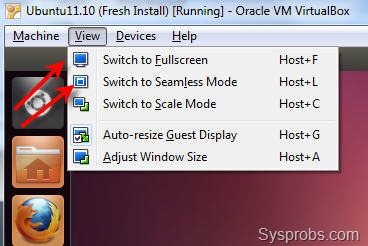
The complete installation steps of Ubuntu 11.10 on VirtualBox not covered here, it’s very easy to follow (Refer the earlier guide Ubuntu 10.10 on VirtualBox). Once the installation is completed, the next restart will land on Unity 2D desktop (which happened automatically for me), so you get Unity 2D in VirtualBox even before install guest additions. But, other extra features such as auto screen re-size and seamless mode are not enabled without guest additions.
only 2d login screen
Therefore, let’s install the virtualbox guest additions on Ubuntu 11.10 and get these extra display improvements and check the 3D unity.
3D acceleration in virtual machine setting is already enabled.
display settings
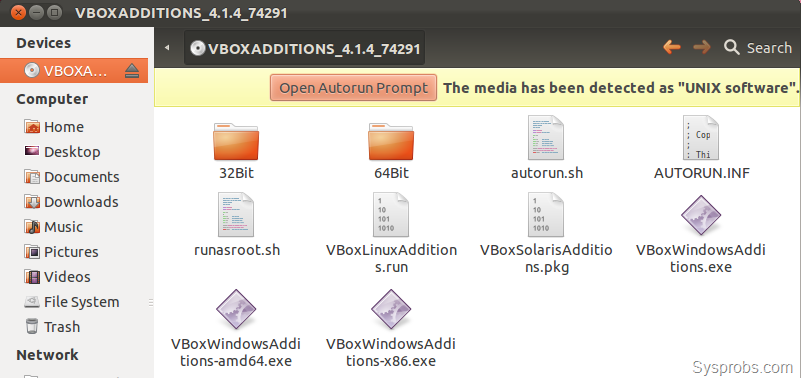
My main aim is to get Unity 3D in Ubuntu 11.10 with VirtualBox, so I tried to install guest additions in three methods,
1) Running and executing the script from built in VirtualBox Guest additions ISO.
install from CD
2) Running following command in terminal. Make sure guest virtual machine can communicate to internet and download packages.
sudo apt-get update
sudo apt-get install virtualbox-ose-guest-utils

3) Executing following commands in Ubuntu 11.10 terminal with internet access.
sudo apt-get update
sudo apt-get install build-essential linux-headers-$(uname -r)
sudo apt-get install virtualbox-ose-guest-x11


I did above three installation steps individually as doing from beginning (used snapshot feature to revert back virtual machine), but could not get 3D unity login option. Even though all three were succeeded and got extra features as shown below.
extra options by vb guest additions
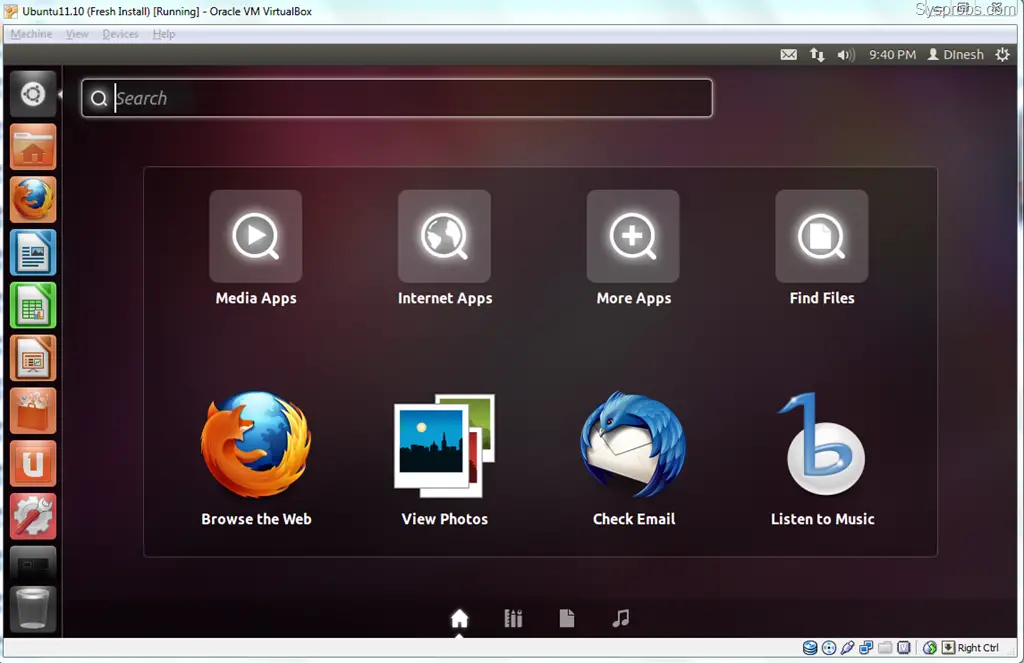
Restarting the virtual machine after every above installation steps landed on 2D unity only.
working 2D unity in VirtualBox 11.10
Now my question is, is this 3D Unity or should I get anything better then above screen (which is called 3D unity) ?
As per official conversation in VirtualBox forum, the latest VB 4.1.4 is still not supported for Ubuntu 11.10- click here to read.

How to Check 3D Unity Support

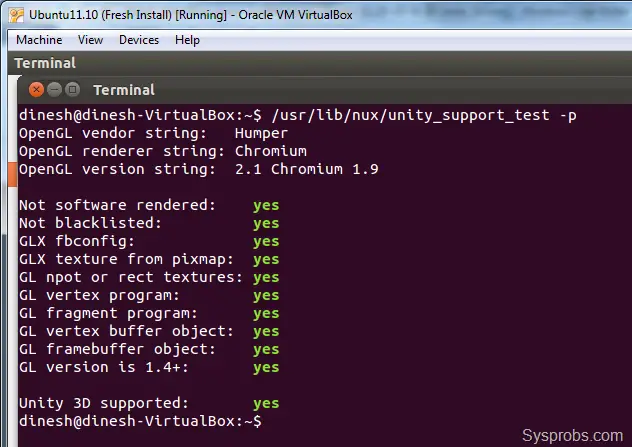
To check whether the virtual or physical machine can run Linux Ubuntu 3D unity, here is the command to check the compatibility, (Type the command and press Enter)
/usr/lib/nux/unity_support_test -p
Surprisingly Ubuntu 11.10 virtual machine returned the below result as 3D unity is supported.
3d unity test
But I’m sure 3D unity is currently not enabled in guest machine. So, I started 3D unity manually by following command,
unity --replace

unity manual start
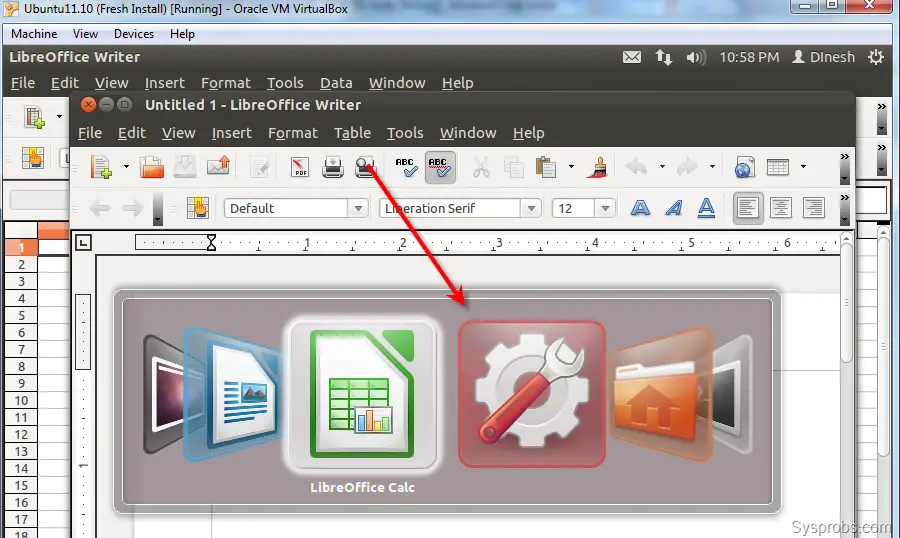
Now, I could see the difference in desktop and 3D unity started working, even though the terminal screen started to throw some errors for each action.
How I can confirm it? pressing ALT+TAB is working like below which is part of 3D unity.
working 3d unity 11.10 in virtualbox

If you are great fan of Ubuntu and Oracle VirtualBox I’m sure this guide and my experience would be helpful  in some way. If there is a work around to make the 3D unity permanent without starting it manually, please share in comments area.

2013년 11월 14일 목요일

Ubuntu Flash Plugin Installer

Welcome to Adobe Forums.

You can follow these steps :

1) Login with "root" user on your Ubuntu 12.04

2) Launch "Terminal" (Keyboard Shortcut : Ctrl +Alt +T)

3) Type this command and hit Enter : sudo apt-get install flashplugin-installer

4) Launch Firefox and check do you have Flash Player (http://www.adobe.com/software/flash/about/)

Thanks,
Vikram

2013년 10월 12일 토요일

Example of autoconfig and automake in Ubuntu


今度はautomakeとautoconfの使い方を調べてみた。手順は長いけど自分で用意するのは「ソースコード」「Makefile.am」の二つで、
이번에는 automake와 autoconf의 사용법을 조사해 봤다. 순서는 길지만, 준비할 것은 "소스코드", Makefile.am" 으로, "configure.in"
「condigure.in」(autorecnfの時は「condigure.ac」)はテンプレを修正して作成すればおけらしい。
この3つさえ用意すればあとは環境にあわせてライブラリやヘッダファイルの存在などをチェケしつつコンパイルするというなんかカッコいいのが作れる!

cmakeはクロスプラットフォーム向け、autoconfはGNU系列なのでLinux向けってことか?どっちも設定ファイルは実質1つ(Makefile.amは2行だし)なので労力はそんなにかわらないと思われ。個人的にはcmakeの方が好みだな、ドキュメント少ないけど、、、

事前準備

ソースコード「strchr.c」

//config.hが存在するなら読み込む
#ifdef HAVE_CONFIG_H
#  include "config.h"
#endif

#if HAVE_STDIO_H
#  include 
#else
int printf (const char *format, ...);
#endif

#if HAVE_STRING_H
#  include 
#else
#  ifndef HAVE_STRRCHR
#    define strrchr rindex
#  endif
char *strrchr ();
#endif

int main (int   argc, char *argv[]){
  char *p, *program_name;

  p = strrchr (argv[0], '/');
  if (p == NULL) program_name = argv[0];
  else program_name = p+1;

  printf ("program_name: %s \n", program_name);

  return 0;
}

configure.inの生成

autoscanコマンドで「configure.scan」を作成
&gt;&gt;autoscan
「configure.scan」を修正し、「configure.in」を作成。赤字が修正部分。
#                                               -*- Autoconf -*-
# Process this file with autoconf to produce a configure script.

AC_PREREQ(2.61)
#初期化
AC_INIT(StrChr, 0.1, yosilove@mail)
#automakeの初期化
AM_INIT_AUTOMAKE(strchr, 1.0.0, no-define)
AC_CONFIG_SRCDIR([strchr.c])
AC_CONFIG_HEADER([config.h])

# Checks for programs.
AC_PROG_CC
AC_PROG_INSTALL

# Checks for libraries.

# Checks for header files.
AC_HEADER_STDC
#ヘッダファイルの存在確認
AC_CHECK_HEADERS([stdio.h],[AC_DEFINE(HAVE_STDIO_H)],[AC_MSG_ERROR([Sorry, can't do anything for you])])
AC_CHECK_HEADERS([string.h],[AC_DEFINE(HAVE_STRING_H)],[AC_MSG_ERROR([Sorry, can't do anything for you])])

# Checks for typedefs, structures, and compiler characteristics.
AC_C_CONST

# Checks for library functions.
AC_CHECK_FUNCS([strrchr])

AC_CONFIG_FILES([Makefile])
AC_OUTPUT

Makefile.amを作成

automakeの設定ファイルである「Makefile.am」を用意
#実行ファイル名
bin_PROGRAMS = strchr
#ソースコード
strchr_SOURCES = strchr.c
以下、「1.自分でやるよ」と「2.autoreconfに任せるよ」に分岐 

1-1) aclocal

automake用のマクロファイル(.m4)を生成するために「aclocal」コマンドを実行
&gt;&gt;aclocal
「autom4te.cache」と「aclocal.m4」ができる。 


1-2) config.h.inの生成

&gt;&gt;autoheader
「config.h.in」が生成される 


1-3) Makefile.inの生成

automakeコマンドに「-a」オプションを付けてMakefile.inの生成
&gt;&gt;touch NEWS README AUTHORS ChangeLog
&gt;&gt;automake -a
「NEWS」「README」「AUTHORS」「ChangeLog」がないといけないのでtouchコマンドで生成。automakeすると「INSTALL」「COPYING」「depcomp」「missing」「install-sh」と「Makefile.in」が生成される。 


1-4) configureの生成

&gt;&gt;autoconf
「configure」が生成される。 


2) autoreconfでconfigureを作る

1)シリーズのコマンドってテンプレだし、いちいち入力するのめんどいよね〜

というわけで、普通はまとめて実行出来るように「bootstrap」や「autogen.sh」なスクリプトを書いておくんだけど、、、

それらをまとめてやってくれるコマンド「autoreconf」を使うという方法もある。ちなみに、「configure.in」でもできたりするが、autoreconfを使うときはファイル名は「configure.ac」の方が正式。
&gt;&gt;touch NEWS README AUTHORS ChangeLog
&gt;&gt;autoreconf -i
「bootstrap」や「autogen.sh」と比べるとちょっと劣るらしいけど、大体のプログラムはこれで通るらしい。 


Makefileの生成

&gt;&gt;./configure
「config.status」「config.log」「config.h」「stamp-h1」と「Makefile」ができる。 


実行ファイルの生成

&gt;&gt;make
「strchr.o」と「strchr」ができる、strchrを実行すると
&gt;&gt;./strchr 
program_name: strchr 

apt-get server resetting (서버 변경하기)

apt-get install, update, upgrade로 상당한 고생을 많이 했다. 우연히 알게된 apt-get서버 변경방법~, 정말 유용합니다. 많은 도움이 되었으면 좋겠습니다.

---------------------------------- 
apt-get 이용하다가 가끔 서버가 사망한다고 할지 응답이 없을경우가 있다. 이럴 때 업데이트 서버를 변경하여 사용하면 되겠다. 말필요 없고 그림 따라서~ 

1. 시스템 - 관리 - 소프트웨어 소스 영문판도 그대로 :: System - Administration - Software Source

 2. 원하는 서버가 없다면 기타를 눌러주자.


 3. 원하는 서버를 선택 가까운 서버 찾기 하니까 본인은 일본쪽 선택되더라....

Networking restart in Ubuntu

Ubuntu Linux user use sudo command with above Debian Linux command:
# sudo /etc/init.d/networking restart

To start Linux network service:
# sudo /etc/init.d/networking start

To stop Linux network service:
# sudo /etc/init.d/networking stop

sudo passwd root in Ubuntu (루트계정 만들기)

다음은 우분투에 root 계정과 암호를 만들어 주는 방법입니다.

프롬프트에서
&gt;&gt; sudo passwd root


그러면 현재 암호를 먼저 묻습니다. 현재 로그인한 ID의 암호를 한번 입력해 주면 이제

&gt;&gt; Enter new UNIX password:

라고 나오며 root 의 암호를 2번 묻습니다. 새 암호를 만들어 적어 주면 됩니다.

그러면 이제 root 로 로그인할 수 있습니다. root 계정이 생기는 것입니다.

Ctrl+D키를 눌러, 로그아웃한 후 root 로 로그인해 봅니다.


그런데 root 의 패스워드가 짧고 간단하다면 해커들의 표적이 됩니다. 되도록 길고 복잡해야 합니다.

Howto update kernels in Ubuntu

--
우분투에서 와이어레스드라이버가 잡히지 않을 때,
이 문제를 해결하는 가장 간단한 방법 중 하나가 우분투 커널을 업데이트 하는 것이다.
When there is no wireless driver in Ubuntu OS You update kernels.
One of the simplest ways to solve the problem with that is to update Ubuntu kernels.

$ sudo apt-add-repository ppa:francisbrwn9/kernels

$ sudo apt-get update

$ sudo apt-get dist-upgrade


그리고, 재부팅, 아래와 같은 방법으로 업데이된 커널의 버전을 확인한다.
And then, reboot, and confirm the version of the kernels updated.

$ uname -r

--

Howto install Emacs in Ubuntu.

&gt;&gt;
&gt;&gt;sudo apt-get install emacs-snapshot-gtk
&gt;&gt;

Howto Install OpenCV-2.3 in Ubuntu (OpenCV-2.3 설치하기)

OpenCV-2.3버전 설치하는 방법에 대해서 설명한다. OpenCV-2.4버전에서도 이 방법은 유효하다.
Installing OpenCV 2.3 in Ubuntu.I had a lot of problems initially to install and port the OpenCV library to Python. But after reading a lot of blogs I finally found a solution which I have posted below.

1)사전에 필요한 라이브러리 설치한다.
1)Install all pre requisites

&gt;&gt;sudo apt-get install build-essential
&gt;&gt;sudo apt-get install cmake
&gt;&gt;sudo apt-get install pkg-config
&gt;&gt;sudo apt-get install libpng12-0 libpng12-dev libpng-dev libpng3
&gt;&gt;sudo apt-get install libpnglite-dev libpngwriter0-dev libpngwriter0c2
&gt;&gt;sudo apt-get install zlib1g-dbg zlib1g zlib1g-dev
&gt;&gt;sudo apt-get install libjasper-dev libjasper-runtime libjasper1
&gt;&gt;sudo apt-get install pngtools libtiff4-dev libtiff4 libtiffxx0c2 libtiff-tools
&gt;&gt;sudo apt-get install libjpeg62 libjpeg62-dev libjpeg-progs libjpeg62-dbg
&gt;&gt;sudo apt-get install ffmpeg libavcodec-dev libavcodec52 libavformat52 libavformat-dev
&gt;&gt;sudo apt-get install libgstreamer0.10-0-dbg libgstreamer0.10-0 libgstreamer0.10-dev
&gt;&gt;sudo apt-get install libxine1-ffmpeg  libxine-dev libxine1-bin
&gt;&gt;sudo apt-get install libunicap2 libunicap2-dev
&gt;&gt;sudo apt-get install libdc1394-22-dev libdc1394-22 libdc1394-utils
&gt;&gt;sudo apt-get install swig
&gt;&gt;sudo apt-get install libv4l-0 libv4l-dev
&gt;&gt;sudo apt-get install python-numpy
&gt;&gt;sudo apt-get install build-essential libgtk2.0-dev libjpeg62-dev libtiff4-dev libjasper-dev libopenexr-dev cmake python-dev python-numpy libtbb-dev libeigen2-dev yasm libfaac-dev libopencore-amrnb-dev libopencore-amrwb-dev libtheora-dev libvorbis-dev libxvidcore-dev
2) 파이센 헤더를 설치한다
2)Install the python development headers

&gt;&gt;sudo apt-get install python-dev

3) OpenCV소스코드를 다운로드 한다.
3)Download the source code:
http://sourceforge.net/projects/opencvlibrary/files/opencv-unix/2.3/
4)압축을 푼다.
4)Go to the directory where OpenCV is downloaded via the terminal only and then un zip the package:
(note:- It is recommended that you move the downloaded OpenCV package to the home/ directory

&gt;&gt;tar -xvf OpenCV-2.3.1a.tar.bz2
&gt;&gt;cd OpenCV-2.3.1/

5) 압출을 풀어서 만들어 진 OpenCV 폴더 안에 build 디렉토리를 만든다
5)Now make a new directory called build and go in to it
&gt;&gt;mkdir build
&gt;&gt;cd build
6)Cmake한다.
6)Run Cmake

&gt;&gt;cmake -D WITH_TBB=ON -D BUILD_NEW_PYTHON_SUPPORT=ON -D WITH_V4L=OFF -D INSTALL_C_EXAMPLES=ON -D INSTALL_PYTHON_EXAMPLES=ON -D BUILD_EXAMPLES=ON ..

7) Make한다.
7)Now make

&gt;&gt;make
8) make install 한다.
8) Make it permanent

&gt;&gt;sudo make install
9)공유라이브러리 사용을 위한 OpenCV설정
9)Configuring OpenCV for using shared libraries:

&gt;&gt;sudo gedit /etc/ld.so.conf.d/opencv.conf

Add the following line at the end of the file (it may be an empty file, that is ok) and then save it:

/usr/local/lib

Close the file and run the following command to configure the library:

&gt;&gt;sudo ldconfig

OR RUN : export LD_LIBRARY_PATH=/usr/local/lib

10).bashrc file을 열고 아래를 덧붙인다.
10)Open your .bashrc file and add the following:
&gt;&gt;gedit .bashrc

or sudo gedit /etc/bash.bashrc


add the following at the end of the file -


PKG_CONFIG_PATH=$PKG_CONFIG_PATH:/usr/local/lib/pkgconfig
export PKG_CONFIG_PATH

Save and close the file
11)재부팅한다.
11)Reboot the system

http://ubuntuone.com/0qwnXh8VoufDMHGiu5kLIK (Link to download this text file)

How to install audio driver for realtek

Make sure that your system is updated (including the kernel and libncurses5-dev) and ready to compile the drivers: update and then use the following command to make sure that all the libraries and packages are installed for compiling the sound driver:

To update the package cache and checks for broken dependencies
&gt;&gt;sudo apt-get check


To resynchronize the package index files from their sources
&gt;&gt;sudo apt-get update

To install the newest versions of all packages currently installed on the system from the sources enumerated in /etc/apt/sources.list, Packages currently installed with new versions available are retrieved and upgraded;
&gt;&gt;sudo apt-get upgrade

To prepare systems to compile driver; we need to insall the following package:
&gt;&gt;sudo apt-get install build-essential checkinstall automake linux-headers-generic libncurses5 libncurses5-dev xmlto gettext

to install :
&gt;&gt; sudo aptitude install build-essential libncurses-dev gettext xmlto xmltoman linux-headers-`uname -r`


Download the realtek audio driver from the following url:

http://www.realtek.com.tw/downloads/downloadsView.aspx?Langid=1&amp;PNid=24&amp;PFid=24&amp;Level=4&amp;Conn=3&amp;DownTypeID=3&amp;GetDown=false#High%20Definition%20Audio%20Codecs

Alternate Location:

http://122.146.118.42/downloads/downloadsView.aspx?Langid=1&amp;PNid=24&amp;PFid=24&amp;Level=4&amp;Conn=3&amp;DownTypeID=3&amp;GetDown=false

Look for HDA Drivers and accept the License and then Go to the Linux/Unix section and then clink on one of the download site links for Linux driver (2.4 or 2.6), download and save this file on your hard disk in a folder:

Open a terminal; change to folder where you saved the driver.
to unpack use the command:

&gt;&gt;tar -jxvf "downloaded-driver-file-name"

It shall extract and create a folder with the name "realtek-linux-audiopack-X.XX"

change to the folder and to compile and install the driver run
&gt;&gt;sudo ./install

It would show lots on info on the screen while driver is complied and installed;
After the driver is installed a configuration screen pops up

Configure the system according to your preference:

It would play a sound; if you hear the sound; it working; Enjoy.

You may have to configure front speaker and headphone volumes.

If jack sense does not work i.e. headphone plug does not mutes the speakers;
added the following options line to the file /etc/modprobe.d/alsa-base:

&gt;&gt;gksu gedit /etc/modprobe.d/alsa-base

at the end of above file add the following line:

options snd-hda-intel model=acer

Report back if it works or not.

ssh setting in ubuntu

A way to set up ssh in ubuntu will be presented.
the detail of ssh manual contains URL below for Korean version.

http://wiki.kldp.org/wiki.php/DocbookSgml/SSH-KLDP

1. install by apt-get

$ sudo apt-get install ssh

2. change port

$ sudo gedit /etc/ssh/sshd_config

# port 22 : remove # then, enable port22 to be active

3. restart demon

$ sudo /etc/init.d/ssh restart

4. confirm whether server works or not

$ netstat -ntl
tcp6        0        0        :::22(port number)       :::*        LISTEN    →   works well

Howto use apt in Ubuntu

apt는 최신 패키지를 다운로드 하여 설치하게 되는데 upgrade 하기전에 update 해서 source.list 를 갱신 하는것이 좋다.
1. 패키지 캐쉬 갱신 및 자동 업그레이드
# apt-get update
# apt-get upgrade

2. 개별 패키지 설치
# apt-get install &lt;패키지명&gt;

3. 원하는 패키지 찾기
# apt-cache  search &lt;패키지명&gt;

4. 원하는 패키지 찾은 다음 정보 출력
# apt-cache show &lt;패키지명&gt;

5. 의존성 검사 수행하면서 업그레이드
# apt-get -s dist-upgrade

6. 설치한 패키지에 이상이 있어 다시 설치시
# apt-get --reinstall install &lt;패키지명&gt;

7. CD-ROM 목록 추가
# apt-cdrom add

8. 패키지 삭제
# apt-get remove &lt;패키지명&gt;
또는 # dpkg -P &lt;패키지명&gt;

9. 삭제하는 패키지의 설정화일들가지 모두 삭제시
# apt-get --purge remove &lt;패키지명&gt;

10. dselect에서 선택한 패키지의 설치 및 삭제
# apt-get dselect-upgrade

11. 설치된 패키지를 볼때
# dpkg -l
참고)   apt-get install 명령어로 받은 deb 파일의 저장 위치
          /var/cache/apt/archive/
        위 폴더에 .deb 패키지파일로 저장됨

12. 설치에 실패한 패키지를 삭제할 때
# apt-get -f install
# dpkg -r (패키지 이름)